Cut it, or prompt it
onto the timeline.
kimchi is a desktop video editor with a built-in harness for image and video models. Prompt a shot straight onto the timeline, animate a frame you like, extend a clip from its last frame or bridge two shots with a generated transition, then cut, trim and export it like any other footage.
Version 0.1 · free and MIT licensed · macOS, Windows, Linux · Rust core · bring your own keys, or run everything locally
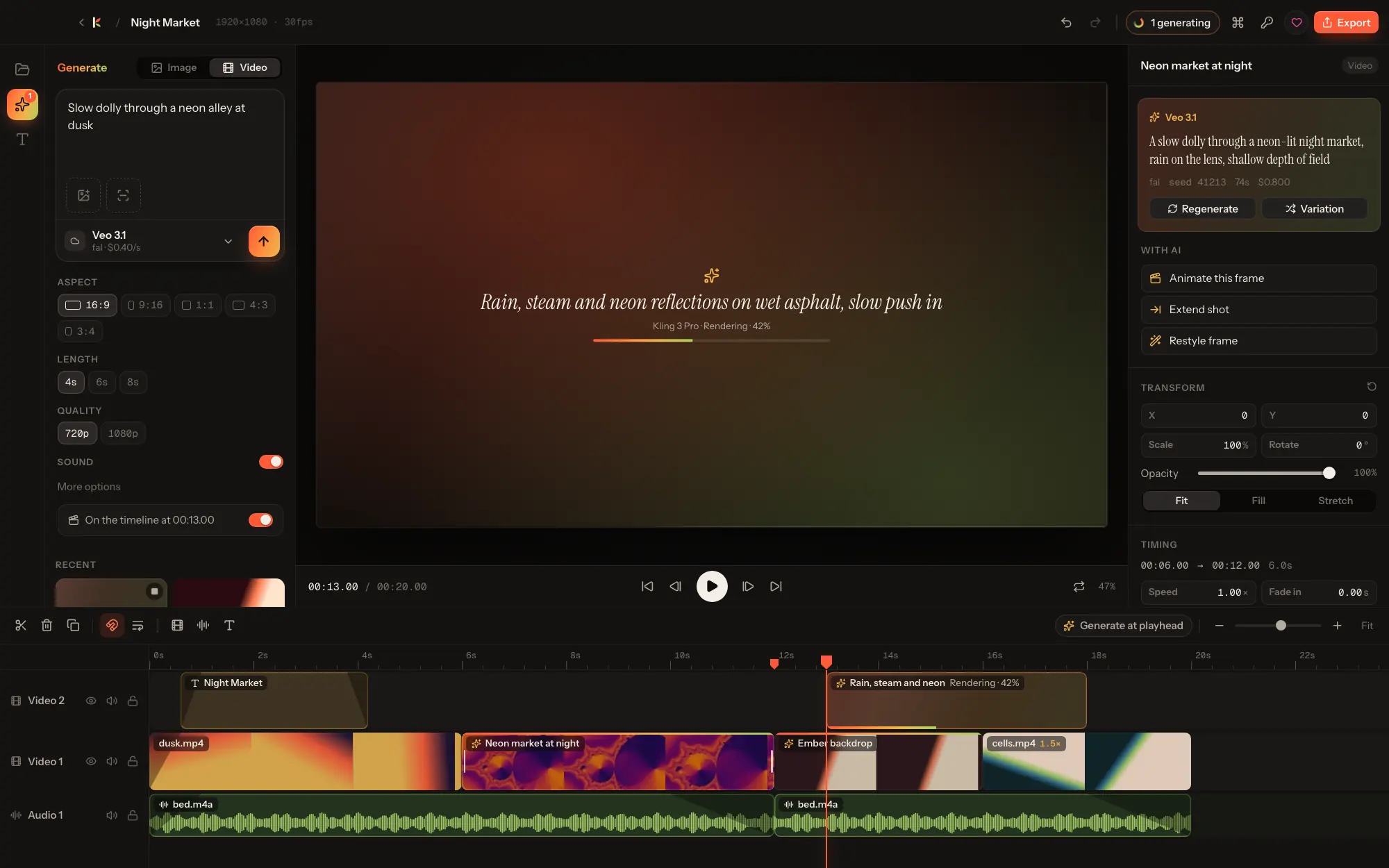
Not a separate tab. Part of the cut.
Every generation starts from where you are on the timeline, and lands there as a clip you can trim like footage.
Generate where the shot goes
A placeholder clip appears where the shot will go and turns into the result when it's done.
Fill the hole
Right-click empty space on a track; the shot is sized to fill it.
Animate this frame
Turn the frame under the playhead into a moving shot.
Extend shot
Continue a clip from its last frame, landing right after it.
Bridge two shots
First frame and last frame, taken from the clips on either side.
Every asset remembers
Prompt, model, seed and inputs are kept with each generated asset: regenerate or make variations in one click.
A real editor underneath.
kimchi started as a fork of OpenCut and was rewritten from the ground up in Rust. The interface is thin: every edit is plain data applied by the Rust core, and the window renders what Rust returns.
- Multi-track timeline with video, image, text, solid and audio clips.
- Split, trim, ripple delete, duplicate, cross-track moves, snapping and markers.
- Per-clip transform (position, scale, rotation, opacity, fit), speed, fades and volume.
- Live preview compositor with on-canvas move and scale handles.
- Snapshot undo and redo for every edit, and autosave.
- Export to MP4 (H.264), HEVC, ProRes, WebM, GIF or audio only, through one ffmpeg filter graph. ffmpeg is bundled.
Your keys, or nothing leaves your machine.
Keys live in your OS keychain and are only sent to the provider they belong to. Model lists are fetched live, and every model declares what it can do, so the generate panel only shows controls that apply.
| Provider | Runs | Images | Video |
|---|---|---|---|
| OpenRouter · fal · Replicate · Together AI | cloud | Yes | Yes |
| Google Gemini · xAI · Runway · Luma AI | cloud | Yes | Yes |
| OpenAI · Black Forest Labs · Stability AI | cloud | Yes | — |
| ComfyUI, with your own workflows | local | Yes | Yes |
| Stable Diffusion WebUI (A1111, Forge, SD.Next, Draw Things) · Ollama · any OpenAI-compatible images server | local | Yes | — |
Your own ComfyUI workflows become models.
Export a workflow in API format into ~/Documents/kimchi/comfyui-workflows. Each file becomes a model. Put placeholders in any string input and kimchi fills them in; a workflow with a video save node is treated as a video model.
# placeholders kimchi fills in
{{prompt}} {{negative_prompt}} {{seed}}
{{width}} {{height}} {{steps}} {{cfg}} {{denoise}}
{{duration}} {{fps}} {{frames}}
{{image}} {{start_image}} {{end_image}}   # uploaded for you
The engine, without the window.
The kimchi command runs the same Rust harness and renderer as the app: list providers and models, generate with any of them, and render a project headless. Projects are plain JSON and every edit is plain data, so an agent can read and write them directly.
An MCP server, so Claude Code, Codex and any MCP client can drive the open project live, is the next step on the way to the lsuite standard.
# what is ready, and what each provider offers
kimchi providers
kimchi models fal

# generate: images, or video with --video
kimchi generate fal fal-ai/flux-2-pro "Night market, rain, neon" --aspect 16:9 --count 2
kimchi generate fal fal-ai/kling-video/v3/pro/image-to-video "Slow push in" \
    --video --image frame.png --duration 5

# render a project, no window needed
kimchi render night-market.json night-market.mp4 --format mp4 --quality high
Download kimchi
ffmpeg is bundled. kimchi checks for updates on launch and installs them in one click; updates are signed.
Also: Windows .msi · Linux .deb · Linux .rpm · All releases. The macOS build isn't notarized yet: the first time, right-click the app, then Open.
Free, open source, yours to fork.
kimchi is MIT licensed with every feature included. Model providers bill you directly for what you generate; kimchi takes nothing in between. Donations keep it moving.